The Ask
A client asked us for a quick-turn around, "art of the possible", proof of concept for an AI agent that could create 3D Blender data visualizations. The agent should be able to send and receive emails, csv attachments of CSV data as input, generate preview renders for early feedback and full quality renders for the final output (returned via email).
This particular client is technical himself. Success for the project was validating if the idea was feasible or not in as little time as possible. Our client wanted to validate the approach and high level architecture. Everything else, like UIs, would be low fidelity and "vibe coded" to save time.
Initial Research and Design
Our team has scant experience with 3D modeling. The first step in the project was to familiarize ourselves with Blender and do some basic research.
Blender is open-source 3D modeling software. You typically run the Blender application locally to generate a low-fidelity preview of the 3D model or animation. Once your scene is designed, you hand off the Blender file to a render farm to do the "rendering." Rendering is a compute-intensive process that generates a full-quality image or video from the raw Blender file.
Thankfully, Blender has built-in support for Python. Within Blender you can execute Python code to inspect and modify the scene. Given this, we know the core component of the application will be a code-generation agent. The industry-standard practice is to assume AI-written code could be malicious and to execute it only in a sandboxed environment isolated from the rest of the application code. This sandbox will also need to have Blender available.
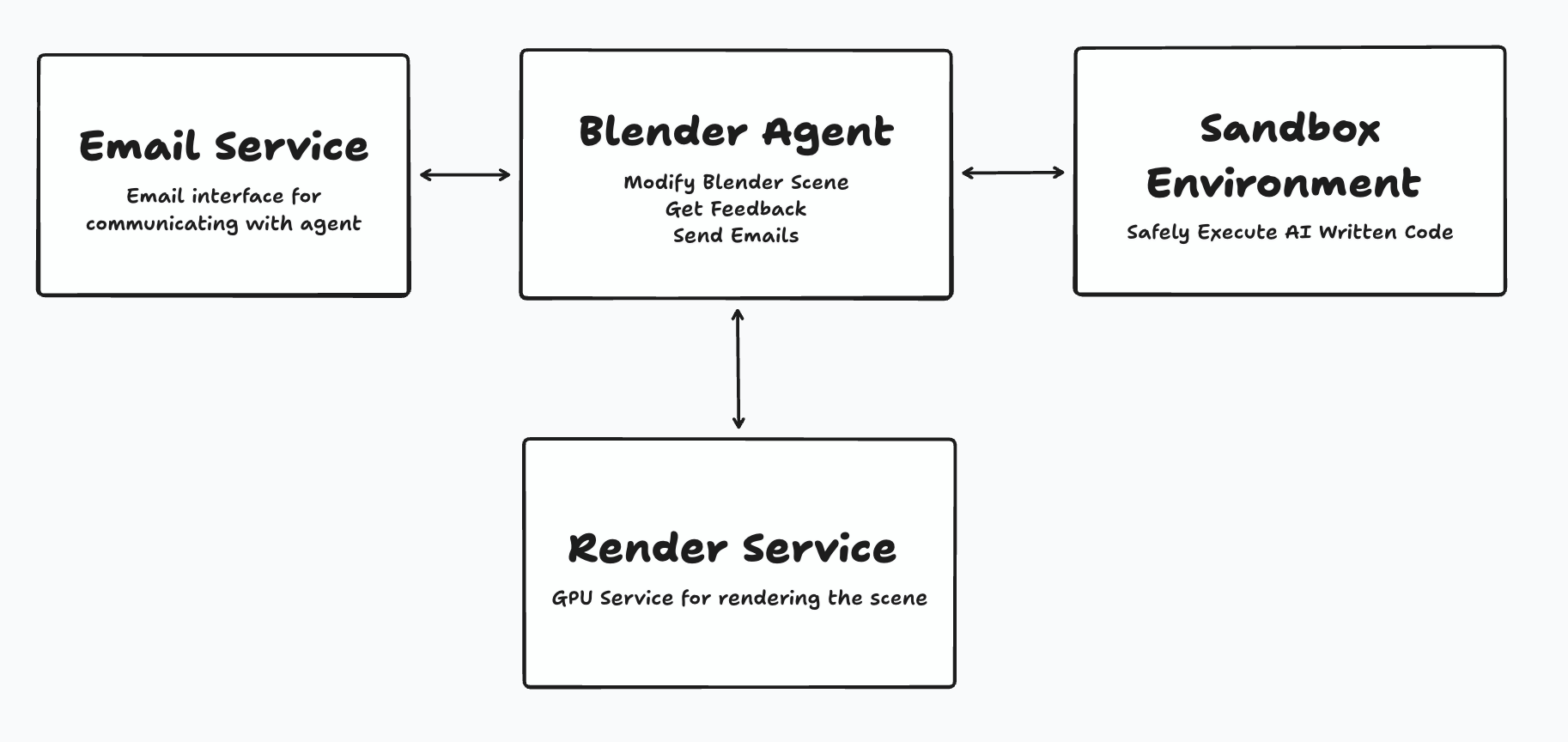
With that, our initial design and requirements start to fall into place:
- A feature for sending and receiving emails. This needs to include support for attachments and forwarding those attachments to the agent.
- A sandbox for executing LLM-written code safely. This sandbox needs to have access to the Blender application.
- A service for generating preview and full-quality Blender renders. The agent will use preview renders to gather feedback, and full-quality renders are the end product given to a user.
The initial design looked something like this:
Building the Proof of Concept
Bootstrapping the Blender Agent
We began with the crux of the application, the agent itself. LLMs are fantastic at writing code, but we immediately ran into a few sticking points. In particular, 3D modeling requires positioning elements along three axes (duh), setting up lighting and the camera, and moving all of these elements over time to create an animation. An LLM can easily generate a square at 0, 0, 0, but when you render that image you won't see anything if the camera isn't pointed at it correctly! LLMs do not yet have great 3D spatial awareness. Telling the LLM to "move the camera closer" will not consistently yield the result you want.
Simply put, the agent didn't work out of the box. When this happens you need to manually bootstrap the agent. Our preferred approach is to manually collect training examples and include them in context.
For this project we used Claude Code controlling a local Blender application via the Blender MCP (Model Context Protocol) server to collect these initial examples. Our iterative process involved:
- Creating simple, static data visualizations as baseline examples
- Having Claude Code analyze the scene and write detailed guides on recreating it via Python
- Asking Claude Code to reimplement the project from scratch using only the guide
- Identifying and addressing shortcomings in our documentation through this reimplementation process
We iterated this process, created building block examples, and eventually moved into more complex visualizations with animations. Once the agent has baseline functionality, we can scale up the learning process faster by collecting examples from users.
Secure Code Execution in a Sandbox
Having an agent write code means we needed a secure sandbox to execute that code in. A sandbox is an isolated environment fully separated from the rest of the application code. In the unlikely event that the LLM generates any malicious code, that code won't be able to access the rest of the application.
For each agent request, we:
- Start a new sandbox
- Populate the sandbox with the Blender file and any needed Python scripts
- Control the sandbox to execute the Python code against the Blender file
- Clean up the sandbox after use
This is a "stateless" approach where we can delete the sandbox instance after every execution. A "stateful" approach where the project is persisted in the sandbox would enable lower latency and speed up agent responses, at the cost of being more complex to maintain.
For this project we opted to use Daytona. Other providers like E2B would be equally good choices. We've designed this part of the application to be vendor-agnostic. If our client ever wants to swap out vendors it should be trivial to do so.
GPU Infrastructure on RunPod
Creating visualizations like this requires a "rendering" process where the simplified file is translated into the full-quality video output. This process is incredibly compute-intensive. Big movie studios will use render farms to generate visual effects. These render farms don't offer programmatic access, so we had to create our own. We explored a few GPU-as-a-Service offerings and eventually landed on RunPod. RunPod has the right mix of power and ease of use, and still allows our service to scale to zero. That way, when there are no active renders, we aren't spending any money.
Creating our internal render service involved customizing a Docker image with Blender and other required dependencies, deploying that image on RunPod and making that accessible to the core application and agent.
With that in place (and some clever use of tools), the agent is able to request a preview render and then wait for that render to be complete before critiquing itself. Given the resources they consume, full-quality renders are only available to the user, not the agent.
Email Service Integration
A core requirement from our client was the ability to interact with the agent via email. This included sending attachments, such as a CSV of data to visualize. Services like SendGrid and AWS SES enable applications to send and receive emails. Receiving the email involves parsing the email contents and forwarding the parsed data to the server to integrate with the actual application logic.
There are only two moderately tricky parts to the email feature:
- Ensuring that attachments were passed along to the agent correctly.
- Configuring DNS records and waiting for those changes to propagate
Overall, email input and output is a straightforward feature that can be easily integrated into any AI application.
The Core Agent Loop
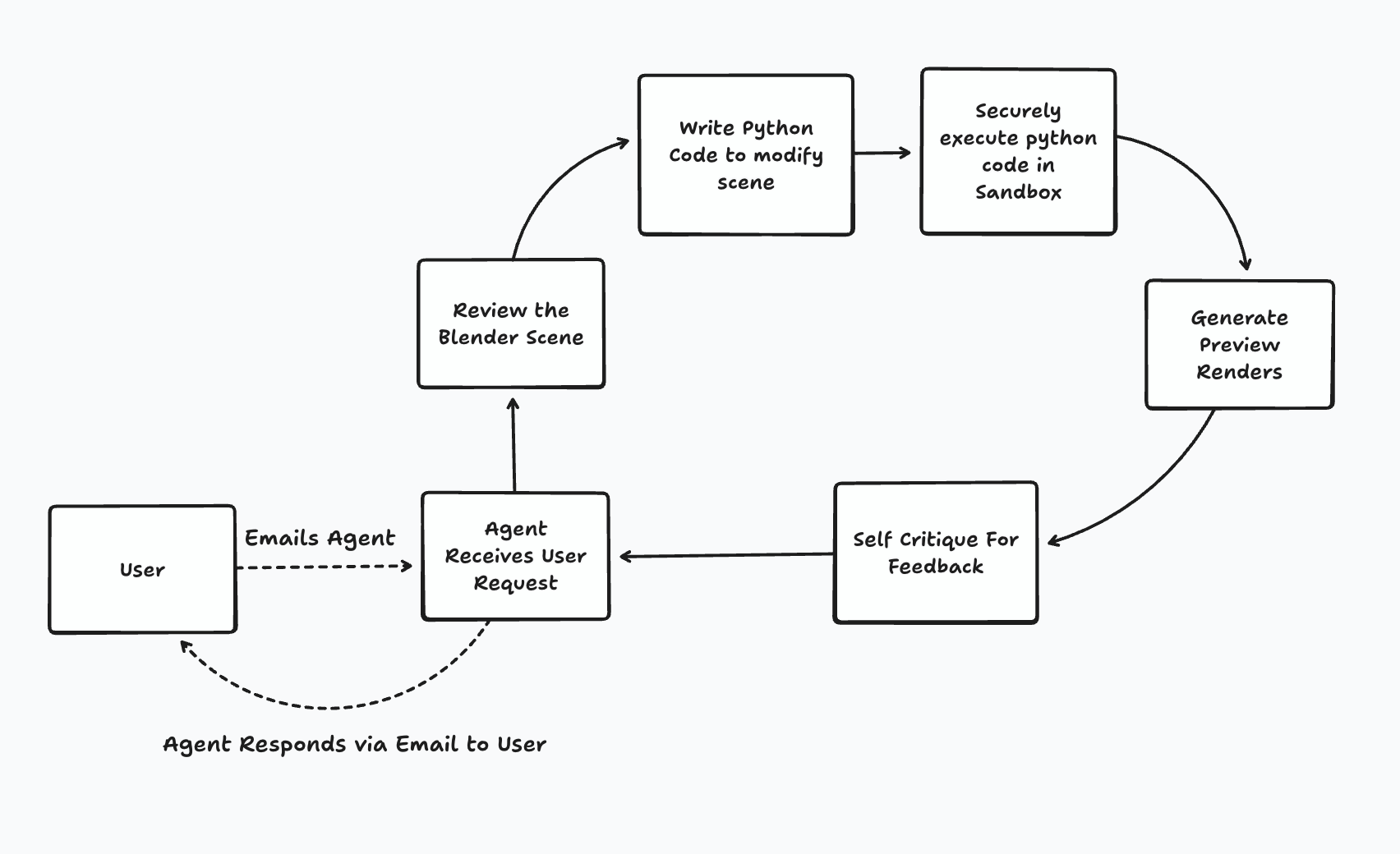
Putting it all together, the agent loop is as follows:
1. Receiving Requirements
Users email the agent with their data and natural language descriptions of their visualization goals: "Show quarterly sales growth as animated 3D bar charts with our brand colors" or "Create a network visualization of system dependencies with traffic flow animations."
2. Understanding Blender State
Before modifying anything, the agent uses a tool call to understand the current Blender environment. This includes objects, cameras, lighting, and any animation logic.
3. Generating and Executing Python Code
The agent then writes Python code to modify the file, and safely executes that code in a Daytona Sandbox.
4. Preview and Self-Critique
The agent generates low-resolution preview renders and evaluates them against the user's requirements. If the preview shows areas for improvement, the entire loop can be repeated.
Live Preview
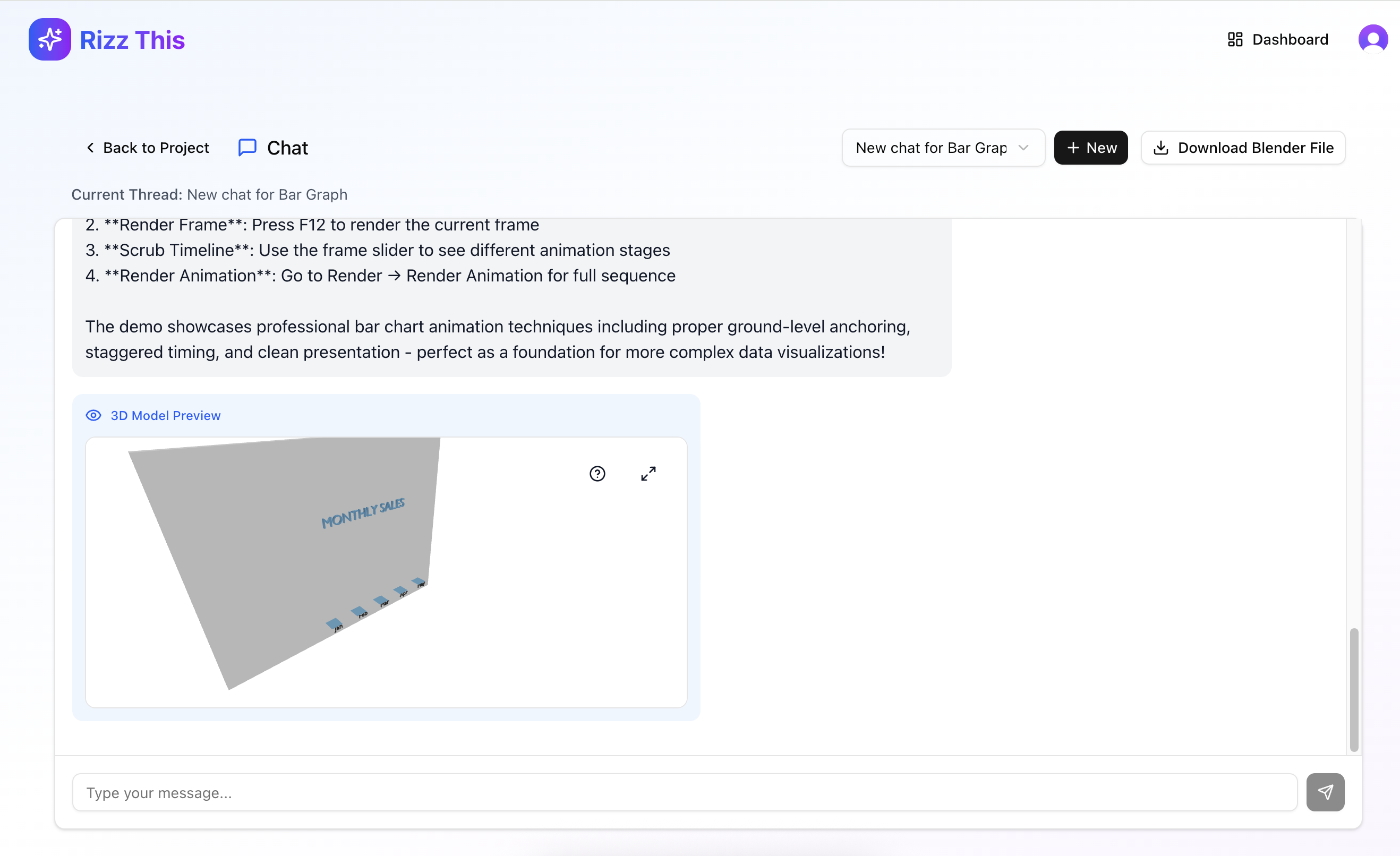
While we were working on this, we realized that a nice feature to have would be showing the preview in the browser, if that was possible. We were able to export the Blender file and make it accessible in a format that could render in the browser, and we were able to incorporate this browser preview functionality. This screenshot of the chat interface shows what a user could see if they wanted to preview it in chat, although email is the primary interface.
Project Approach
Given the tight turn around timeline and how the client would use the project going forward we needed to build this project closely with the client. We followed a 2 week sprint process:
Discovery (Days 1-2)
We clarified P0 requirements, compared architecture options, agent approaches, and vendor solutions. After presenting our findings, we aligned on a lean, email-first design that prioritized core functionality over polish.
Narrow Solution (Days 3-7)
We built a CLI-first approach—shipping a slim command-line tool containing all agent logic with no client-facing wrapper. This let us validate code generation, scene control, and rendering workflows early, de-risking the hardest technical challenges before building UI or persistence layers.
Full Feature Set (Days 8-12)
We connected the remaining pieces: ephemeral sandboxes for secure execution, GPU rendering infrastructure, and email parsing. This completed the full loop: email input → preview generation → iteration → final render delivery.
Final Delivery (Days 13-14)
We delivered a working MVP that proves end-to-end viability. The client now has a clear path to scale with stateful workspaces, user dashboards, visualization templates, and production operations.
Final Deliverable and Outcome
After the two weeks we were able to return a working proof of concept back to the client. We had succesfully validated the approach and high level architecture. The client now knows the project is feasible and can make further decisions on how to invest in it.